Marketplace
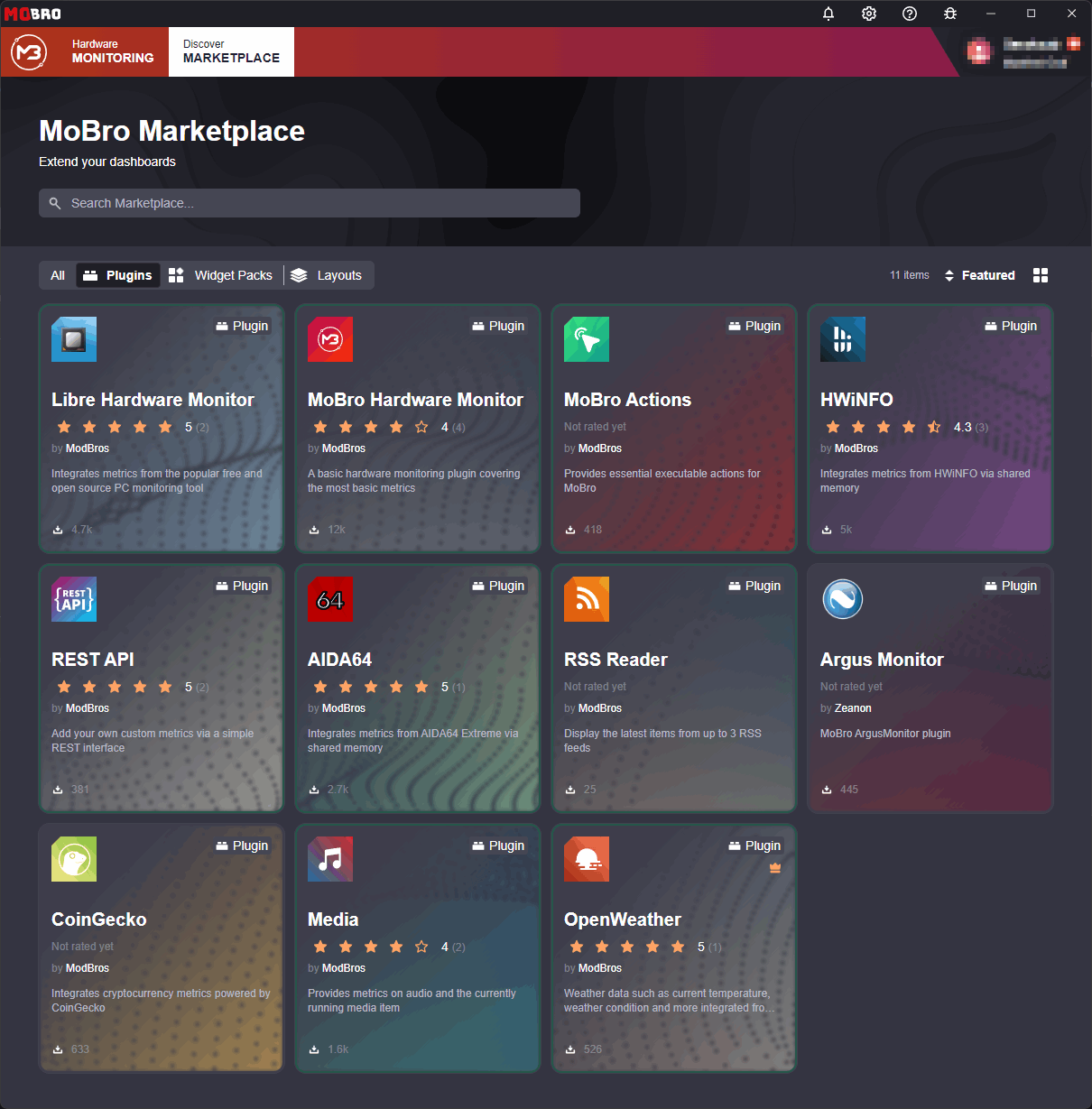
The MoBro marketplace allows users to install and manage plugins (and widget packs) directly from within the application.
API Key
Publishing to the marketplace requires an API key. You create and manage your API keys yourself in MoBro:
- Open the settings and turn on Developer options in the General section.
- Log in with your MoBro account.
- Open the Developers page in the User section of the settings and select Create API key.
- Optionally enter a description to tell your keys apart (e.g.
GitHub Actions for my plugin) and choose when the key expires: never, after 30, 90 or 365 days, or on a custom date. - Copy the key and pass it to the CLI using
--api-key.
The key is only shown once, right after it was created. If you lose it, delete it and create a new one.
Keep the key secret. Don't commit it to your repository.
Managing API Keys
Every API key belongs to an author. Your personal author is set up together with your first key. If you're a member of an organization, the Developers page lists it as a separate author with its own keys.
On the Developers page you can also:
- Edit a key to change its description or expiration.
- Disable a key. It stops working immediately, and can be enabled again at any time.
- Delete a key you no longer need. It stops working immediately, and this can't be undone.
- Check the statistics of your published items, such as the total downloads, downloads this week and average rating.
Each author can hold a limited number of API keys at once and publish a limited number of items per type. Both limits are shown on the Developers page. Unpublished items count towards the limit as well. If you need more, reach out to us in the developer channel on our Discord.
Before Publishing
- Test the plugin in MoBro. Install the published
.zipfile locally first, see Testing. - Set the version. The plugin's version is taken from the
<VersionPrefix>in the.csprojfile. Increase it for every release. - Complete the plugin configuration. Fill in the
displayName,author,description,tags,repositoryandhomepagefields in themobro_plugin_config.json. - Publish the
.zipfile using the CLI. The marketplace requires thebuild_info.jsonfile thatmobro publishadds to the.zipfile. When publishing manually, add it yourself, see Publishing without the CLI.
Publishing
The MoBro Plugin CLI publishes a plugin to the marketplace using the
marketplace-publish command, which takes the plugin's .zip file as an argument:
mobro publish .
mobro marketplace-publish --api-key [your_api_key] .\example_plugin_0.0.1.zip
The displayName, description, tags, homepage and repository of the listing are taken from
the mobro_plugin_config.json inside the .zip file. Localization keys are resolved using the English localization
file.
New Plugin
If the plugin is not yet listed in the marketplace, the CLI asks for confirmation and creates the listing. It then sets
up the listing using the following files, located in the same directory as the .zip file:
| File | Used as |
|---|---|
logo.svg, logo.jpg or logo.png | The plugin's logo. The first file found is used. |
marketplace.md | The plugin's store page (Markdown). |
install_notice.md | The notice shown when the plugin is installed (Markdown). |
For every file that doesn't exist, the CLI prompts for a path instead. Leave the prompt empty to skip it.
Existing Plugin
If the plugin is already listed, the CLI publishes a new version of the existing plugin. If the displayName,
description, tags, homepage or repository changed, the listing is updated accordingly. The logo, store page and
install notice are not updated; use the commands in Updating the Listing instead.
- Each version can only be published once. Increase the
<VersionPrefix>in the.csprojfile before publishing again. - The version of the MoBro Plugin SDK referenced by the plugin is stored as the minimum SDK version of the release (e.g.
1.2.0for SDK1.2.x). Only raise the SDK version when you need its features, so the release stays compatible with older MoBro installations.
Updating the Listing
The following commands update the information of a plugin that is already listed in the marketplace. The plugin is
identified by its unique name, as defined in the mobro_plugin_config.json.
| Command | Description |
|---|---|
mobro marketplace-update-info --api-key [key] [plugin_name] | Updates the general plugin information (prompts for input). |
mobro marketplace-update-logo --api-key [key] --logo-file .\logo.png [plugin_name] | Updates the plugin's logo. |
mobro marketplace-update-store-page --api-key [key] --store-page-file .\store-page.md [plugin_name] | Updates the plugin's store page (Markdown). |
mobro marketplace-update-install-notice --api-key [key] --install-notice-file .\install-notice.md [plugin_name] | Updates the notice shown when installing the plugin (Markdown). |